
This section dives into the technical details of CosmiChord and it’s Level Editor, and how they evolved throughout the course of the capstone.
My capstone project is broken down into two halves, since the capstone itself is two quarters long. The first half focused on the Level Editor, and is primarily amount the Event System, the last major feature addition to the editor. The second half is focused on CosmiChord itself and polishing its user interface (UI) into a final, publishing-ready state.
As of current writing, the second quarter of my capstone is still ongoing. As such, this page will only cover the first quarter of the capstone, highlighting the Level Editor.
CosmiChord as a project has lasted for 3-4 years before my Capstone started.
This quarter focused on the CosmiChord Editor, and specifically includes the implementation of the Event System.
The Event System was the last major feature to be added to the level editor. It’s premise is relatively simple; have small “events” that can be placed in a level which affected some component of the other beatmap objects. For example, a “color change” event which simply changes the color of an object at a certain point. Or a “freeze event” which simply freezes an object in its place. The fundamental idea with the Event System is that, through these small “building block” events, level designers can produce advanced level effects that are unseen in the Virtual Reality rhythm game space.
There were a couple of iterations of the Event System throughout the capstone, with each iteration improving on the performance and usability of the Event System until it satisfied the requirements of CosmiChord’s internal level design team.
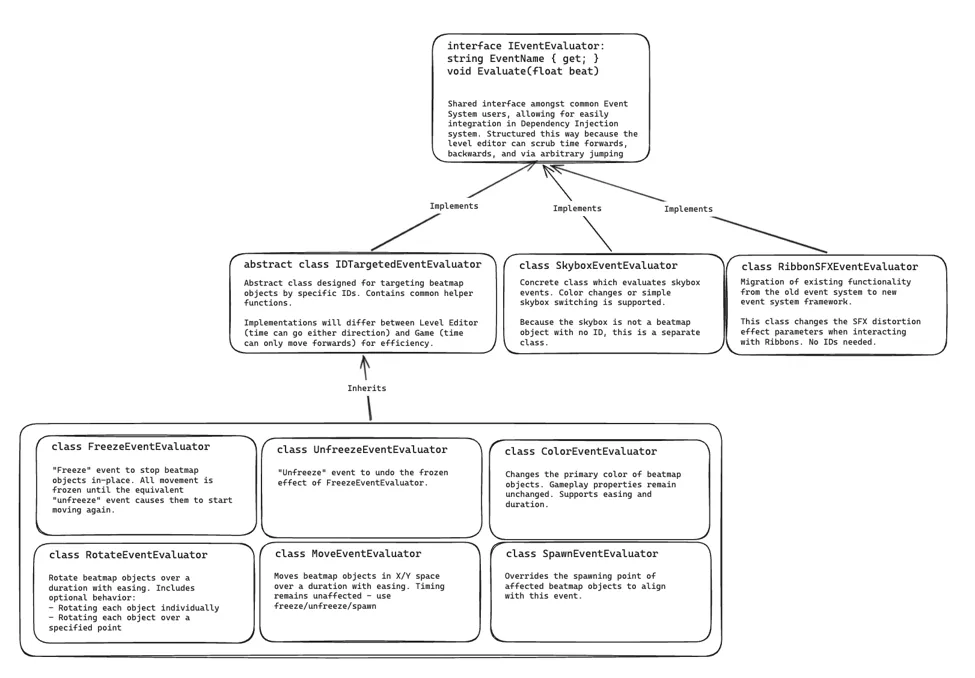
The first iteration comprised of a single Event Evaluator interface which provides a shared interface for all events which would be incorporated into the Event System.
The main “star of the show” would be the IDTargetedEventEvaluator. This is because, to target objects in CosmiChord levels, the Event System utilizes an “ID” consisting of a name and integer pair. This class would provide common functionality for handling ID targetting, which would then be implemented by individual event evaluator classes for every supported event in the Event System: Freeze, unfreeze, coloring, etc.
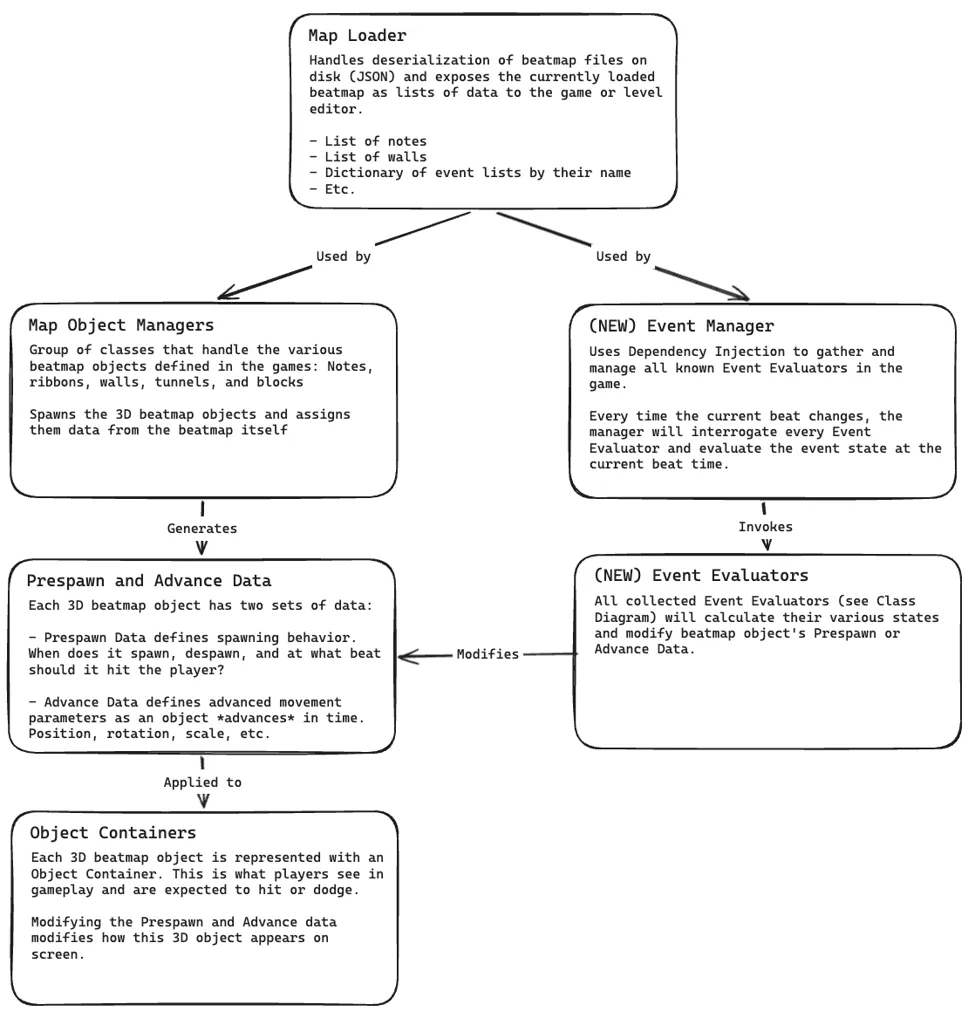
Event Evaluators were originally designed to be singletons; one Event Evaluator per unique type of event, responsible for handling state calculations for potentially hundreds of objects. Unfortunately, I quickly ran into constraints with this design upon initial implementation. One “master” class handling all event state evaluations just got too unwieldy, and I needed an immediate design pivot if I wanted the Event System to be a reality for the Capstone.
The solution for my initial design pitfalls was to pivot away from the Singleton pattern. Instead of having one master class control the event states of all objects, each individual object would instead keep track of its own state.
And thus, the Event Aggregator system was born. The old Event Evaluators were cut out, and each beatmap object now kept track of many Event Aggregator classes. Each individual Event Aggregator only handles the state of a single event (making “Aggregator” a bit of a misnomer), multiple Event Aggregators combined together created the full event state for an object: Color changes, freezing, movement, rotation, etc.
The successful design of the Event Aggregator system meant that it could also be applied outside of beatmap objects. For example, the Skybox uses its own individual Event Aggregator to track the color state of the skybox, and Event Aggregators are implemented elsewhere to handle explicit spawning/despawning of objects.
The current Event Aggregator system is what is currently being used within CosmiChord today, however there were still further iterations to refine the design, mostly in performance.

The biggest performance bottleneck was the search space for events. Event-heavy maps created by CosmiChord’s level designers had event counts into the tens of thousands. Each frame, every Event Aggregator searched a list of all events, performing thousands of costly string comparisons (remember, an ID includes a name which is a string) and dictionary look-ups. As you can see above, this could be as bad as 88.64 miliseconds in worst cases; for context, 16.66 miliseconds is how fast your frame needs to be in order to render at a smooth 60 FPS. For a Virtual Reality rhythm game, where performance needs to consistently hit 72-90 FPS on mobile hardware, this was unacceptable.
The solution was to compromise a bit of memory efficiency in order to precompute lists of events for every Event Aggregator. The precomputation occurs when a map is loaded, or the user modifies events via Level Editor interactions. Multi-threading helps to ensure that the precomputation stays fast and, because precomputation happens off of Unity’s main thread, the user does not notice the step happening. Instead of going through the entire search space, Event Aggregators simply query a smaller list containing all events targeting that Aggregator. The smaller list heavily reduces the search space and completely eliminates expensive string comparisons, significantly improving the performance of my system.